
Taptap Send: Money Transfer
Taptap Send, Inc.Finance
4.714.46K Reviews
- Version
- 2.105.0
- Installs
- 10.00M
- Age Rating
- Everyone
Screenshots

Our Review of Taptap Send: Money Transfer
 Analysis by Appyee
Sending money across borders can feel more complicated than it should. There may be family members waiting for support, bills that cannot wait, or a need to move money between countries without turning the process into a long administrative task. I tried Taptap Send with that first-time-user perspective in mind, and my overall impression is that it is built to make the basic transfer journey feel approachable rather than intimidating.
This is a free finance app from Taptap Send, Inc., focused on international money transfers. It has been available since June 5, 2018, and its popularity is easy to understand: the app shows a 4.7 average from around 335 thousand ratings, with more than 10 million installs. Those figures do not guarantee that every transfer will be perfect for every person, but they do suggest that the service has become a familiar option for people who regularly send money overseas.
What to expect before sending your first transfer
The most useful way to think about Taptap Send is as a focused transfer tool, not as a complete replacement for a traditional bank. Its purpose is narrow and clear: help you send money internationally from a phone. That focus is helpful when you already know who should receive the money and where it needs to go. You are not opening the app to manage a broad collection of everyday banking tasks; you are opening it because a cross-border payment needs to be arranged.
That makes it particularly suitable for people who support relatives in another country, workers who send part of their income home, students helping with household expenses, or anyone who occasionally needs to move money internationally without visiting a branch. I also see value for first-time users who feel uncomfortable with financial apps, because a dedicated transfer experience is easier to understand than a large banking application filled with unrelated menus.
At the same time, I would not choose it automatically for every international payment. If you need a business banking platform, complex currency management, investment tools, or a full record of many different financial products, a regular bank or a more comprehensive money service may suit you better. Taptap Send is strongest when the job is specific: arrange an overseas transfer and keep the process manageable.
The app is free to install and has an Everyone content rating, which makes it broadly accessible from a store perspective. That should not be confused with a promise that every person can send money to every destination without checks or conditions. Financial services still require careful attention to the recipient, the destination, and the instructions shown during the transfer. I treat the app as easy to approach, but I do not treat international payments as something to rush through.
Why the focused design matters
In my experience, the main advantage of a dedicated transfer app is reduced mental overhead. With a conventional bank, an international payment can be hidden behind several layers of account menus, payment types, and unfamiliar terminology. A specialist app puts the transfer at the center of the experience. That does not remove every decision, but it makes the reason for each screen easier to follow.
There is also a practical benefit when you send money repeatedly to the same person. Once you have established the correct recipient details, future transfers can become a routine rather than a fresh research project each time. I still check the recipient carefully before confirming, but the app’s focused purpose encourages a repeatable workflow: open it, review the destination and amount, verify the details, and complete the transfer.
A less obvious strength is that this routine can reduce errors caused by switching between several services. If you normally compare a bank website, a separate calculator, messages with a family member, and a payment confirmation screen, it is easy to copy the wrong amount or recipient information. Keeping the transfer task in one place does not make mistakes impossible, but it can make your personal process easier to control.
Setting up Taptap Send without making avoidable mistakes
The first setup should be treated as a verification stage, not as a race to send money. Install the application, open it, and follow the account instructions carefully. Use your own details consistently, and keep any identity or payment information ready if the app asks for it. Financial apps often need to confirm who is using them, so a delay during setup is not necessarily a sign that something is wrong.
Before entering a recipient, I recommend deciding exactly what the transfer is meant to accomplish. Is the recipient expecting a particular amount, or do they simply need to receive as much as possible from a fixed budget? Those are different goals. Starting with the amount you can afford, rather than beginning with a number copied from an old conversation, helps you avoid committing more than intended.
Recipient details deserve special attention. A familiar name is not enough when more than one person in your contacts has a similar name, and a small spelling difference can create confusion. I would ask the recipient to send their details in one clear message, then compare what they provided with what appears in the app before confirming. This is one of the most important habits for a first transfer because a smooth interface can make a serious payment feel deceptively casual.
Another useful preparation step is to separate the transfer amount from your own living expenses. Do not use the app to send money simply because the process looks quick. International support payments are often recurring, and a small amount that feels manageable once can become a problem when repeated every week or month. I find it helpful to decide on a personal limit before opening the transfer screen.
What to check on the review screen
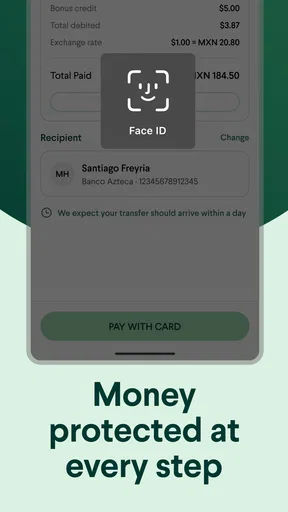
When the app presents the transfer for review, slow down and read every visible detail. Check the recipient, destination, amount, and the way the recipient is expected to receive the money. Also look at the final figures shown by the app rather than relying on a rough mental conversion. Exchange rates, fees, and the amount received can affect the real value of the payment, so the confirmation screen is where I make my final decision.
Do not assume that a previous transfer will always have identical conditions. Currency values can change, and the displayed result may differ from an earlier payment even when you send the same amount. This is a non-obvious point that matters for families budgeting around regular support: the sender’s amount may stay fixed while the recipient’s outcome changes.
If the recipient is waiting for money urgently, set expectations before you confirm. Tell them that you have started the transfer, but avoid promising an exact arrival moment unless the app clearly gives you one for that transaction. A transfer can involve processing steps outside your control. Clear communication is especially important when the recipient is making a purchase or paying a bill based on the expected funds.
Making the first successful transfer
For a first attempt, I would choose a modest amount that is meaningful but not financially stressful. That gives you a chance to understand the complete path, including the recipient’s side, without turning a learning experience into a major risk. Once the transfer is complete, ask the recipient to confirm what they actually received and how the collection or delivery process felt from their side.
A realistic example would be sending support to a family member who needs money for groceries. I would first confirm the recipient’s exact details, choose an amount that fits my weekly budget, review the final conversion and any displayed charges, and then confirm only after checking the destination once more. Afterward, I would wait for the recipient’s confirmation instead of immediately starting another transfer because the first screen looked successful.
That last step is more valuable than it sounds. The sender sees one part of the process, while the recipient may encounter a different practical experience. They may need to follow instructions, provide information, or use a particular receiving method. Learning how the first transfer worked for both people helps you create a safer routine for later payments.
I also suggest saving a simple personal note outside the app with the date, purpose, amount sent, and recipient. This is not a claim about a built-in feature; it is a budgeting habit. It helps you distinguish family support from rent, tuition, emergency help, or a reimbursement, and it makes your own financial records easier to understand later.
For recurring transfers, consistency is more useful than speed. Send on a schedule you can actually maintain, and review the amount each time rather than treating an old transfer as an automatic template. If your income changes, adjust the support amount before the payment becomes a source of stress. A transfer app can simplify execution, but it cannot make an unaffordable commitment affordable.
How Taptap Send compares with familiar alternatives
The usual alternative is a bank transfer. Banks can be preferable when you already have a trusted international payment route, need formal business records, or want all your finances managed under one institution. They may also feel more appropriate for larger or more unusual transactions. The trade-off is that the process can be less focused and may require more navigation.
Cash-based remittance services are another familiar option. They can be useful when the recipient prefers physical collection or does not use a smartphone regularly. However, they may require a visit, a code, or coordination around opening hours. Taptap Send is more convenient for people who want to arrange the transfer from a phone, but it is less suitable if the recipient’s access to digital instructions is limited.
Digital wallets and peer-to-peer payment apps can be excellent for people who send money within the same country or inside a compatible network. Their weakness appears when the recipient is abroad and the two sides do not share the same service. Taptap Send’s value is precisely its international focus, though you should still confirm that your intended route is supported in the app before planning around it.
My practical comparison is simple: use a bank when institutional records and broad financial services matter most, use a cash-oriented service when physical collection is central, and consider Taptap Send when a phone-based overseas transfer is the main task. The best choice depends less on which app has the most features and more on what the recipient can actually use.
Common points of confusion during everyday use
One common misunderstanding is assuming that “sent” means “available to the recipient.” Those stages are not always identical. I would keep the transaction information until the recipient confirms receipt, especially when the payment is important. If something appears delayed, avoid sending a second payment immediately; first review the transaction status and the instructions shown in the app.
Another source of confusion is the difference between the amount you enter and the amount the recipient receives. The final result can be affected by the exchange rate and any charges displayed before confirmation. This is why I would never tell a recipient, “You will definitely receive exactly this amount,” until I have reviewed the final screen and understood which amount the app is presenting.
People also sometimes focus so much on the sending amount that they overlook the destination details. A correct amount sent to the wrong person is still a failed outcome. I use a deliberate pause before confirmation: read the recipient’s name, read the destination, read the amount, then compare those details with the original request. That small pause is more valuable than trying to complete the transfer in record time.
If the app asks for additional information or a review, I would respond carefully rather than repeatedly restarting the process. Keep your personal details consistent and make sure documents or information are clear if they are requested. A financial service may need to complete checks before allowing a transfer, and impatiently entering mismatched information can create more friction.
There is also a human issue that no transfer interface can solve. If a relative asks for money through an unusual message, claims there is an emergency, or pressures you to send funds to a new recipient without a proper conversation, pause before using the app. Confirm the request through a trusted channel. The convenience of Taptap Send should make legitimate support easier, not make suspicious requests easier to obey.
When I would choose something else
I would look beyond this app if my main requirement were detailed account management, multiple financial products, business payment administration, or a specialized record-keeping system. A focused international transfer application is not designed to replace every service a bank provides. I would also reconsider it if the recipient cannot comfortably use the receiving method or needs a physical option that the app does not fit.
I would be cautious about using any transfer app when I have not checked the complete cost and recipient outcome. “Free” refers to the app’s price to download, not a guarantee that every transaction has no cost or that every exchange rate will match a separate reference rate. The amount shown before confirmation is the figure I would use for my decision.
Finally, I would not use a mobile transfer service as a substitute for emergency financial planning. If a payment is needed for a critical deadline, I would leave room for processing time and have a backup plan. The app can make the sending action simpler, but the timing of an international transfer still deserves respect.
My next-step advice for a new user
After the first successful transfer, the best next step is not to increase the amount immediately. Instead, make your process repeatable. Keep the recipient’s details organized, record each payment for your own budget, review the final figures every time, and ask the recipient to confirm the outcome. These habits turn a one-off experiment into a dependable routine.
It is also worth checking the application after updates. The current version is 2.94.0 and it requires Android 8.0 or later, so Android users should make sure their device meets that requirement before troubleshooting an installation problem. If your phone is older than that requirement, the issue is compatibility rather than something you can fix by repeatedly reinstalling the app.
For someone deciding whether to try it, my recommendation is fairly clear. Taptap Send is a strong candidate if you want a straightforward way to organize international transfers from your phone and your recipient can use the supported receiving process. Its focused design, free installation, and large user base make it approachable for a first attempt.
I would still use it thoughtfully. Confirm the recipient, inspect the final amount, avoid promising an exact arrival time without clear confirmation, and keep your own payment records. Those steps address the real risks more effectively than simply choosing the fastest-looking option.
My final view is that Taptap Send succeeds because it keeps the central task visible: sending money overseas without forcing the user through the full complexity of a traditional banking platform. It is not the right tool for every financial situation, but for personal international support and repeat transfers, I found its focused approach reassuring. If that matches your need, start with a small, planned transfer and treat the first successful receipt as the point at which you decide whether it belongs in your regular financial routine.
Privacy and Permissions
See what permissions an app requests and how it handles your data.
- Identity
- read your own contact card
- Contacts
- read your contacts
- Phone
- read phone status and identity
- Photos/Media/Files
- read the contents of your USB storage, modify or delete the contents of your USB storage
- Storage
- read the contents of your USB storage, modify or delete the contents of your USB storage
- Camera
- take pictures and videos
- Microphone
- record audio
- Wi-Fi connection information
- view Wi-Fi connections
- Device ID & call information
- read phone status and identity
- Other
- view network connections, change network connectivity, control flashlight, full network access, change your audio settings, control Near Field Communication, run at startup, control vibration, prevent device from sleeping
Verdict
Strengths of Taptap Send: Money Transfer
- Simple interface makes sending money quick, even for first-time users.
- Supports transfers to several popular remittance destinations.
- Recipient may receive funds through banks, wallets, or cash pickup.
- Transfer fees and exchange rates are usually shown before confirmation.
- Helpful notifications keep you updated on transfer progress.
Limitations of Taptap Send: Money Transfer
- Availability and features vary depending on the sender’s and recipient’s countries.
- Identity checks may delay transfers, especially during the first transaction.
- Exchange rates can differ from those offered by traditional bank transfers.
- Cash pickup options may involve local limits, queues, or extra requirements.
- Customer support response times may vary during busy periods.
Similar Picks in This Category
View All
Google Wallet
Google LLC4.3

Airtel: Recharge, Bank & Loans
Airtel4.0

PayPal - Pay, Send, Save
PayPal Mobile4.2

DANA Indonesia Digital Wallet
PT Espay Debit Indonesia Koe4.5

Binance: Buy Bitcoin & Crypto
Binance Inc.4.8

Cash App
Block, Inc.4.7
Frequently Asked Questions
What is Taptap Send: Money Transfer, and how does it work?
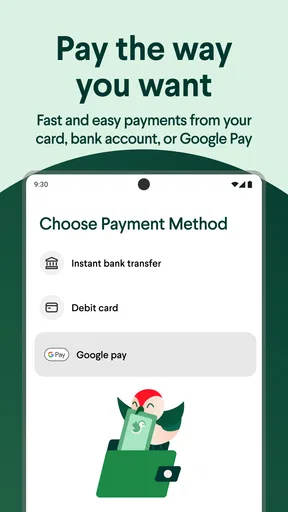
Taptap Send is a mobile money-transfer service designed for sending funds internationally, often to family and friends in supported countries. After creating an account, you generally select the destination, enter the recipient’s details, choose an available payment method, and confirm the transfer. The recipient may receive money through a bank account, mobile wallet, cash pickup, or another local option, depending on the corridor.
Which countries and currencies are supported by Taptap Send?
Availability depends on your country of residence, the destination country, and the transfer route selected in the app. Taptap Send supports specific corridors rather than every country worldwide, and the available currencies, delivery methods, and limits can vary. Before registering or sending money, check the in-app destination list and review the displayed exchange rate, fees, and estimated delivery time for your route.
How much does Taptap Send charge for an international transfer?
Taptap Send promotes transparent pricing and may offer low-cost or fee-free transfers on certain routes, but the total cost can still depend on the destination, payment method, amount, exchange rate, and applicable limits. The app normally shows the recipient’s expected amount and the sender’s total before confirmation. Always review this final summary, since promotional rates and fees can change.
How long does it take for the recipient to receive money?
Transfer speed varies according to the destination, local payout method, banking hours, weekends, public holidays, compliance checks, and the recipient’s financial institution. Some transfers can arrive within minutes, while others may take longer if additional verification is required. Taptap Send typically provides an estimated delivery time and transfer status, but this estimate should not be treated as an absolute guarantee.
Is Taptap Send safe, and what verification is required?
Taptap Send uses account security and identity-verification procedures intended to protect users and comply with financial regulations. You may be asked to provide personal information, identification documents, or additional details before sending money or increasing your limits. Use only the official app, protect your login and verification codes, and carefully confirm the recipient’s information because completed transfers may be difficult or impossible to reverse.
